Products & Technology
Featured Ecosystems


Company
Lottie File Incidents: Case Studies of Third-Party Supply Chain Risks


Although Web3 introduces transformative technologies like smart contracts and decentralized finance (DeFi), it is not immune to the cybersecurity challenges that have long plagued Web2. In fact, the integration of Web2 components within decentralized applications (Dapps) often introduces traditional attack vectors, leading to new modes of exploitation with potentially amplified impacts.
This post details two security incidents involving the Lottie animation format and its ecosystem, highlighting the persistent and evolving nature of third-party dependency and supply chain risks in the modern web landscape.
What is lottiefile?
Lottie is an open-source file format for animated vector graphics, initially developed in 2015 by Hernan Torrisi as an export format for Adobe After Effects. It has since become widely adopted across web, mobile, and other platforms due to its resolution-independent nature, and the ability to define animations through keyframes and tweening within a JSON file. The Lottie Animation Community (LAC), a non-profit project under The Linux Foundation, is dedicated to formalizing the Lottie format as an efficient, scalable, and cross-platform industry standard, fostering an open and transparent development process.
In the dynamic and visually rich landscape of Web3, Lottie has naturally integrated itself. Its ability to deliver high-quality, lightweight, and scalable animations makes it ideal for enhancing user experiences in decentralized applications, non-fungible tokens (NFTs), and various blockchain-based platforms. From interactive buttons and loading indicators, to intricate character animations and captivating visual effects, Lottie allows developers to integrate "cool animations" that are both dynamic and performant, without relying on heavy video files or complex code. The official Lottie website (lottiefiles.com) features a wide range of high-quality animations.
However, the widespread adoption and integration of Lottie, particularly in critical Web3 environments, also present a unique set of security challenges. Given that Lottie files are used by applications through imported libraries, and they are essentially executable JSON, vulnerabilities within the format or its ecosystem can be exploited to deliver malicious payloads, turning a simple animation into a potent attack vector. Multiple Web3 projects have already faced security incidents due to unsafe use of the Lottie library.
Lottie Cross-Site Scripting Security Incident
On June 20, 2025, CoinMarketCap, a major crypto data aggregator, experienced a front-end security incident involving its homepage “doodles” feature. Website doodles are dynamic, often animated visual elements used to enhance user engagement, mark special occasions, or promote content, many of which rely on Lottie-powered animations, exported as JSON files from tools like Adobe After Effects. In this incident, attackers exploited a vulnerability in the Lottie library used by the doodle to inject a malicious JavaScript payload, leading users to encounter deceptive "Verify Wallet" pop-ups intended to trick them into connecting their wallets. CMC swiftly responded by removing the malicious content and implementing mitigation measures.
Attack Path
The attack was a sophisticated front-end supply chain attack leveraging a known vulnerability in the Lottie animation engine.
- Malicious Content Creation: Attackers created a malicious Lottie animation ("CoinmarketCLAP") containing specially crafted JSON, embedding malicious JavaScript code within Lottie's "expressions" feature.
- Doodle Submission & Deployment: The malicious doodle was submitted and entered the random rotation system for the homepage. It is unknown for now how the attackers gained access to the CMC's doodle submission.
- Intermittent Display: The malicious doodle appeared intermittently for users, making immediate detection more challenging.
- Client-Side Execution: When a user visited the homepage and the malicious "CoinmarketCLAP" doodle was displayed, the embedded malicious JavaScript within the Lottie expressions was executed via the
eval()function, a known vulnerability in Lottie'sExpressionManager.js. - User Deception: The executed malicious code created fake "Verify Wallet" pop-ups and tricked users into connecting their wallets.
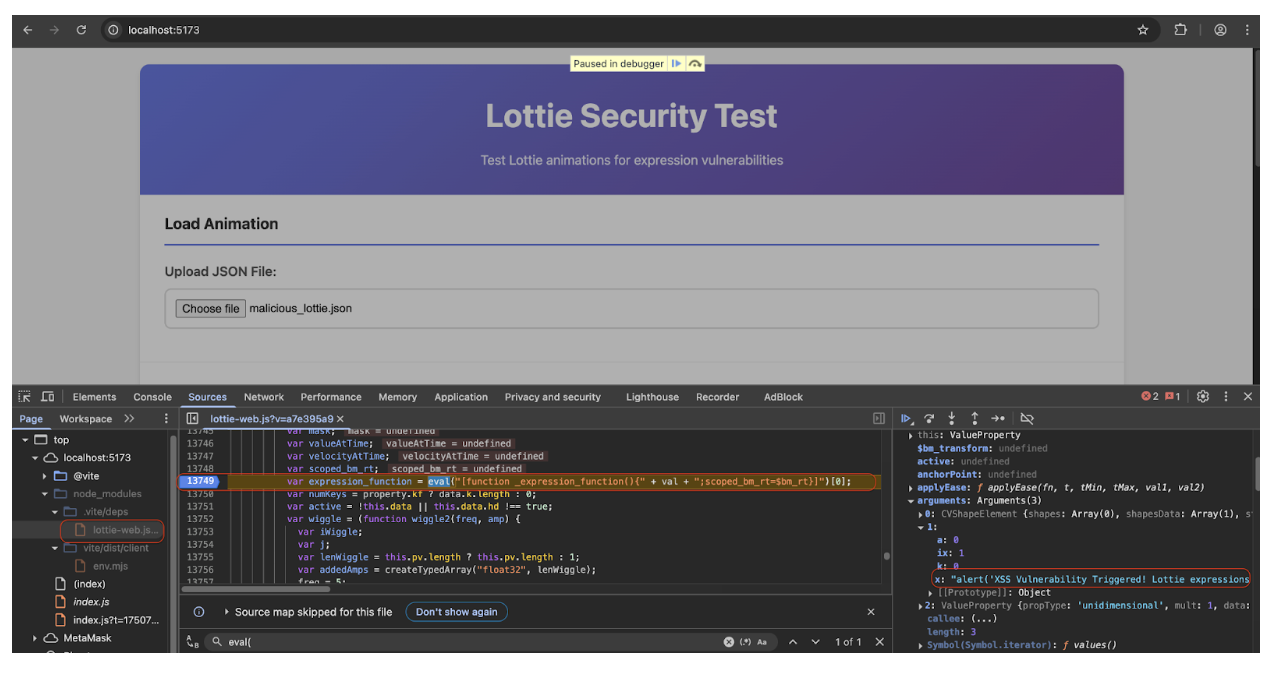
The attack primarily exploited Cross-Site Scripting (XSS) through Lottie animations, using the eval() function within Lottie's expression engine. The lottie-web library allows execution of Lottie files, and the issue appears in the eval() function that reads expressions in the JSON Lottie files. Lottie processes any property with an "x" key as an expression, and ExpressionManager.js recursively searches the JSON for these properties. Any animatable property can potentially contain expressions, with transform, effect, shape, and color properties being the most effective locations.
The screenshot below shows the vulnerable line in ExpressionManager.js (https://github.com/airbnb/lottie-web/issues/2828).
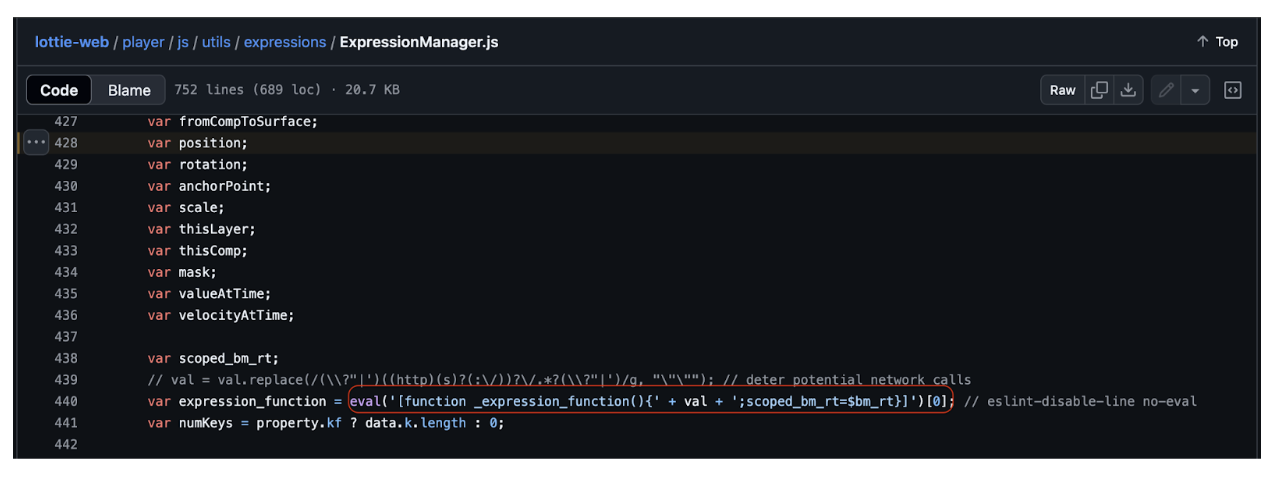
The following is an example of a Lottie animation file containing an XSS payload that can trigger this vulnerability.
"layers": [
{
  "ddd": 0,
  "ind": 1,
  "ty": 4,
  "nm": "Shape Layer",
  "sr": 1,
  "ks": {
    "o": {
      "a": 0,
      "k": 100,
      "ix": 11
    },
    "r": {
      "a": 0,
      "k": 0,
      "ix": 10
    },
    "p": {
      "a": 0,
      "k": [150, 150, 0],
      "ix": 2,
      "x": "alert('XSS Triggered!')"
    },
    "a": {
Proof of Concept
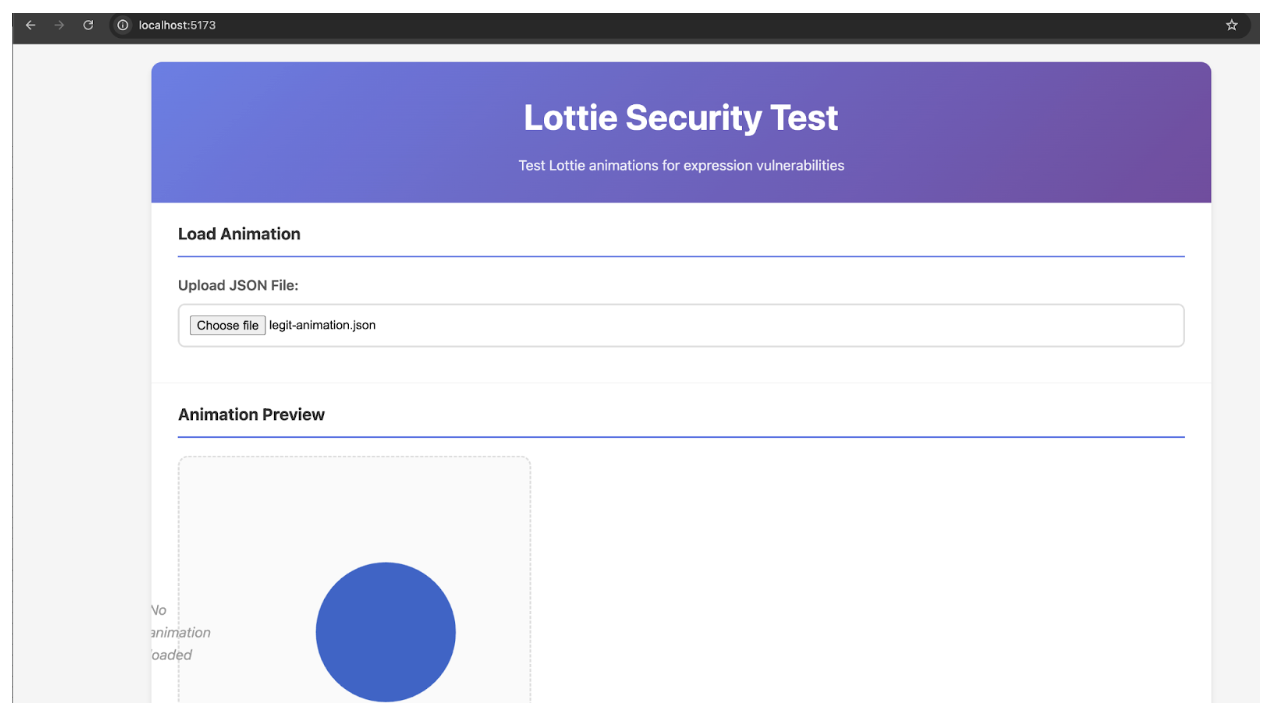
We created a PoC website to demonstrate the vulnerability. First, we load a legitimate Lottie animation file:
Next, the following demonstrates the exploitation of the XSS vulnerability that is triggered when loading our malicious Lottie animation file.
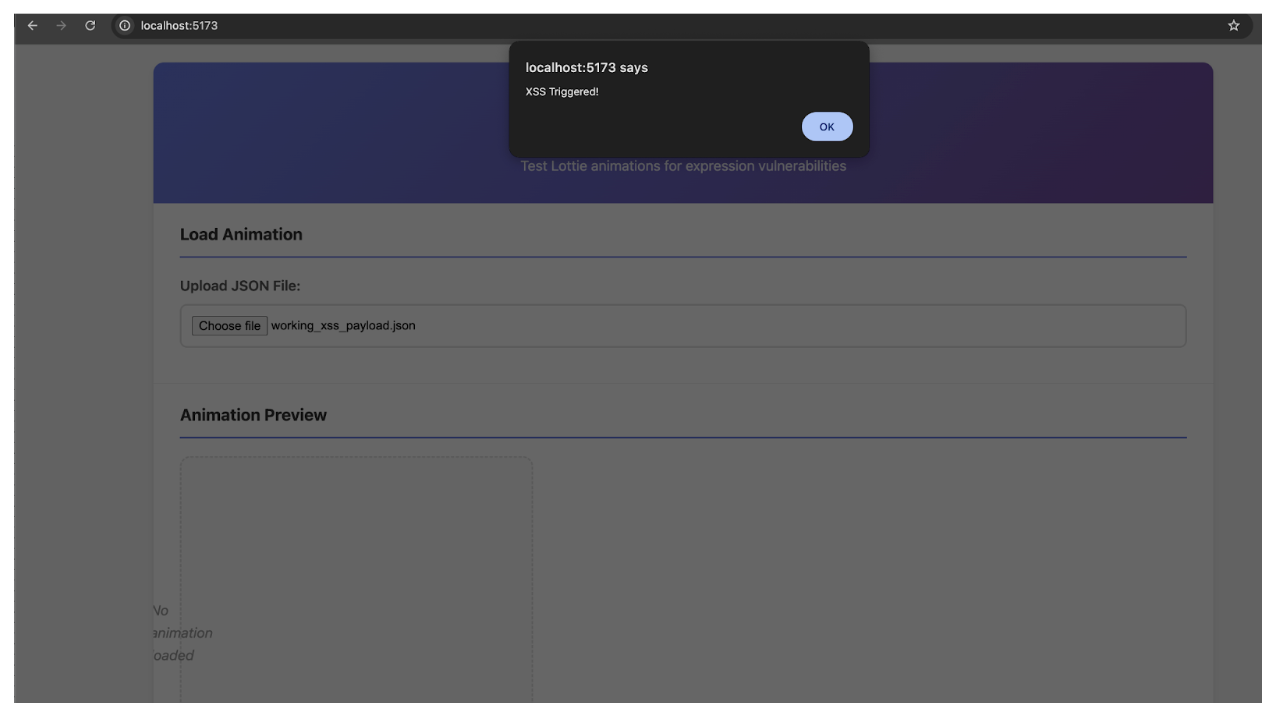
We can observe below that the eval() function from the lottie-web library processes the Lottie animation file containing the XSS payload.
How to self-check the usage of the Lottie library and potential vulnerabilities?
To effectively identify and mitigate potential Lottie-related vulnerabilities, a comprehensive approach involving various testing techniques is essential. Here's how you can self-check for this vulnerability:
- HTTP Traffic Analysis
Look for requests to unpkg.com/@lottiefiles/lottie-player, cdnjs.cloudflare.com/ajax/libs/bodymovin, custom API endpoints serving JSON animation data, or files named lottie.js, lottie-web.js, bodymovin.js.
-
JavaScript library detection with Browser console commands:
console.log(window.lottie || window.Lottie || window.bodymovin); console.log(document.querySelector('lottie-player')); console.log(!!window.lottie && window.lottie.version); console.log(window.lottie && window.lottie.useExpression !== false); // Check if expressions are enabled (vulnerable state)
-
Source Code Analysis
In the Sources Tab, search for lottie.loadAnimation, bodymovin.loadAnimation, useExpression, ExpressionManager, or eval( within Lottie files. In the Elements Tab, look for <lottie-player> web components, SVG elements with Lottie-specific attributes, or container divs with IDs like lottie-container, animation-container.
Best practices to prevent XSS from Lottie library usage in the application
Protecting against this type of attack requires a multi-layered security approach, combining feature restrictions, content validation, policy enforcement, and runtime monitoring. Recommended practices include:
- Disable Lottie Expressions: If not strictly necessary, always disable expressions when initializing the Lottie player (e.g.,
lottie.useExpression = false). Consider the "light" version of Lottie if suitable. - Implement a Robust Content Security Policy (CSP): Use a strong
Content-Security-Policyheader, restrictingscript-srcto only trusted domains. - Strict Content Validation and Sanitization: For any user-generated or third-party content like Lottie JSON files, implement rigorous server-side validation and sanitization. Scan JSON files for expression exploits and actively strip or sanitize expression-related properties.
- Secure Content Delivery Pipeline: Audit access points to content submission systems, implement stronger authentication, and use content verification and code signing.
- Continuous Front-End Monitoring: Implement real-time alerts for unauthorized script execution, unexpected network requests, or unusual user interactions.
Lottie Supply Chain Compromise Incident
On October 30th, 2024, LottieFiles disclosed a critical security incident involving their popular open-source npm package, @lottiefiles/lottie-player. Unauthorized versions (2.0.5, 2.0.6, and 2.0.7) were maliciously published to npmjs.com, containing code designed to prompt users to connect their cryptocurrency wallets and sign malicious transactions. This incident represents a significant supply chain attack, impacting numerous users and dapps such as 1inch, which were automatically served the malicious versions. LottieFiles initiated their incident response, publishing a safe version (2.0.8) and unpublishing the compromised packages.
Attack Path
- Compromised Developer Access Token: The initial compromise originated from a LottieFiles developer's access token, which had privileges to publish new versions to npmjs.com. Investigations revealed that the attacker acquired this token by successfully phishing the employee via email and gaining control of their npm account.
- Malicious Package Injection: The attacker used the compromised token to publish three unauthorized versions (2.0.5, 2.0.6, and 2.0.7) to the npm registry.
- Inclusion of Malicious Code: Malicious JavaScript was embedded within these package versions to trigger fraudulent "connect wallet" prompts.
- Supply Chain Propagation: Users and applications without precise version pinning automatically downloaded and served the malicious versions from npm or third-party CDNs.
- User Exploitation Attempt: End-users interacting with websites or applications loading the malicious Lottie player versions were exposed to fraudulent prompts, creating a pathway for cryptocurrency theft.
Best practices to prevent supply chain attack when loading third-party libraries
- Pinning Dependencies: Always pin package versions to exact releases (e.g.,
2.0.8instead of^2.0.0orlatest) inpackage.json. - Subresource Integrity (SRI): For packages loaded via CDNs, implement SRI hashes in HTML
<script>tags to ensure content integrity. An example SHA for version 2.0.8 issha512-PWfm8AFyrijfnvGc2pdu6avIrnC7UAjvvHqURNk0DS748/ilxRmYXGYkgdU1z/BIl3fbHCZJ89Zqjwg/9cx6NQ== - Regular Dependencies Audit: Run "npm audit", "yarn audit", or use tools like "Snyk", "Dependabot", or "OWASP Dependency-Check" to detect known vulnerabilities and malicious packages.
Summary
The incidents discussed in this blog demonstrate the inherent risks associated with integrating third-party libraries into web applications, especially within the sensitive Web3 ecosystem. Vulnerabilities characteristic of Web2 not only persist in Web3 environments, but also evolve, presenting new modes of exploitation with potentially amplified impacts through trusted supply chains.
Therefore, a proactive stance on security is crucial. Regular audits, penetration tests, secure software development lifecycles, and secure dependency management are key practices for organizations to preemptively identify and address emerging threats. For DeFi users, vigilance is paramount—always review all transaction details presented by your wallet, even if they come from a trusted website.
At CertiK, we have conducted extensive research on various vulnerabilities common in the ecosystem. For thorough penetration testing of applications, audits of your smart contract code, or consultations with our team of experienced auditors and security experts, please get in touch with us.